Managing content is as important as installing the screen. Once you’ve invested in LED signs or other digital signage, the next challenge is keeping the messaging fresh. In Brisbane – with its busy retail strips, schools, medical centres and councils – the choice often comes down to two methods: manually loading new content via a USB stick (or on-site PC) versus using a cloud-based Content Management System (CMS). Each approach can “play” images and video on an LED display, but the workflows are very different.
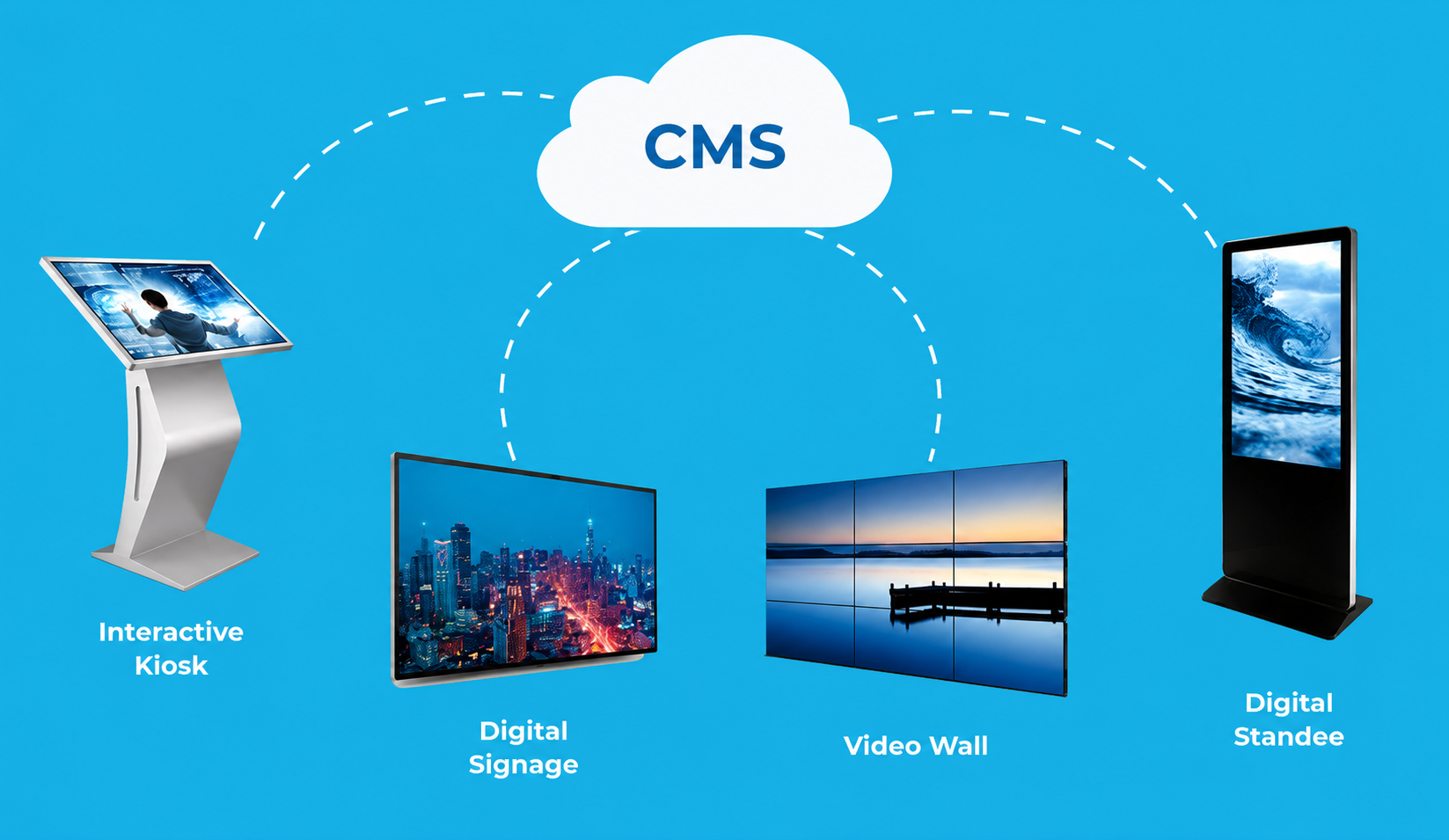
USB playback means someone physically plugs a drive into the display’s media player, or updates a connected computer, every time you change the content. It’s simple for one screen with static messages. But as one industry report points out, “while it’s possible to run a digital display from a USB drive, the capabilities are limited”. In contrast, a cloud CMS is software (often web-based) that lets you update any number of screens remotely, schedule content in advance, manage playlists, and monitor performance. As Samsung’s signage experts note, a cloud CMS “simplifies operations by centralising control” and provides “integrated scheduling tools” so the right message appears on the right screen at the right time.
In practice, cloud and USB are aimed at different needs. USB suits very small setups with few screens and rare content changes, whereas a CMS is built for flexible, multi-site networks. The table below summarises key differences:
- Remote & Real-Time Updates: With a cloud CMS, managers can push new ads and notices to any screen instantly from their desk or phone. USB playback offers no remote updates – each screen must be attended to in person.
- Multi-Site Management: A CMS can control dozens of screens across Brisbane and beyond from one platform. By contrast, USB requires a person to visit each location. As onQ Digital observes, USB playback becomes “increasingly difficult to manage” as the number of screens grows.
- Scheduling & Automation: Cloud software supports timed playlists (e.g. breakfast menu from 7–11am, promos in afternoon). USB-based systems typically just loop whatever you put on the drive, with no built-in clock scheduling.
- Analytics & Reporting: Modern CMS platforms log what content played when, and can generate proof-of-play reports or viewer analytics. USB-only setups have no tracking – once the loop runs, you have no record of what actually displayed.
- User Permissions & Collaboration: A signage CMS allows multiple users (managers, marketers, franchisees) to log in with different roles. Administrators can limit who can change content, and even require approval workflows. In a USB model, control is as loose as who holds the USB stick. As Samsung notes, an enterprise CMS lets “administrators control access based on user roles… ensuring only authorised personnel can make changes”.
These differences aren’t just theory. Consider how often you need to update your sign content. If you run a Brisbane retail chain with weekly sales, or a school that needs daily announcements, a cloud CMS saves countless trips to each store or classroom. But a small medical clinic with one waiting-room screen, playing a few static slides, might manage with a USB plug-in for now. The key is matching the tool to the task.
What Are Cloud CMS and USB Playback?
A Cloud CMS (Content Management System) is software hosted on the internet. You log into a dashboard (via browser or app) to upload images/videos, create playlists, and schedule campaigns. The CMS pushes content updates to all connected displays over the internet. For example, Blink Digital’s cloud platform lets a manager in Brisbane update screens in Toowoomba or Cairns without leaving their office. According to digital signage experts, a CMS can “schedule campaigns remotely, manage playlists, update content in real time, [and] manage multiple locations” all from one place. This centralised approach means any internet-capable device (PC, tablet, phone) effectively becomes your “control board”.
USB playback (also called “offline signage” or “plug-and-play”) is much simpler. Content is loaded onto a USB thumb-drive (or similar media), which someone inserts into the screen’s player or a connected computer. The player then loops through the files continuously. It’s like treating the display as an automated slideshow. USB systems typically only support a single playlist or loop; there’s no scheduling or remote communication. As onQ Digital explains, USB playback is common for “small single-screen environments” where “content changes infrequently”. It requires no internet on site, and there are no ongoing license fees.
However, that simplicity has big limitations. A USB drive can only feed content to that one screen. If a business has two or more signs (even on the same site), each one needs a separate update. Because the player is essentially “dumb” about time or location, everything stays static until the next manual update. There’s also a risk: if the USB drive is lost or the computer crashes, your signs go blank or display old content. A cloud CMS avoids these issues by storing content online and syncing automatically.
Remote Updates and Content Scheduling
The biggest advantage of a cloud-based system is convenience. Updates happen remotely and immediately. Imagine you manage digital menu boards in a Brisbane café. With a CMS, you can sit at your laptop during a break and upload tomorrow’s specials or a sudden promotion. The CMS schedules the new slides to start at 7am automatically. If you discover a pricing error or an urgent announcement, you can fix it on the fly – no waiting for business hours or a staff person on site.
By contrast, with USB you would need to copy the new media onto the stick, physically visit the screen (perhaps outside trading hours), and swap the files. For a single screen this might be manageable; for a dozen screens across Brisbane, it’s extremely inefficient. As Samsung points out, integrated scheduling “ensures the right content is delivered at the right time” – a capability USB drives simply can’t match.
Even on a single site, scheduling matters. For example, Blink Digital might install one LED sign inside a retailer’s store for morning promotions, and another near the exit for evening events. A cloud CMS lets you plan both schedules in one place, and even synchronise them if needed. With USB playback, you’d have to reset each device separately, increasing the chance of human error or mismatch.
Moreover, cloud systems often support dynamic triggers. The Samsung VXT CMS, for instance, can change what’s on screen based on time of day or external data (like weather) automatically. You could set a Brisbane café’s display to switch to an umbrella advertisement when rain is forecast. Achieving any of this with USB would require editing the drive’s content every single day – a waste of time.
Managing Multiple Screens and Locations
If your business has more than one location or screen, a CMS becomes even more compelling. Take a retail chain with stores in South Brisbane, the Gold Coast and on the Sunshine Coast. A cloud CMS lets headquarters push out a nationwide campaign instantly. It “completely changes the game,” as one signage manager said, because you no longer need someone to travel with USB sticks to each store. The sign in Cairns updates itself when the content is published.
On the other hand, USB struggles to scale. The onQ Digital guide notes that USB setups are meant for very few screens, and that they “become increasingly difficult to manage as screen networks scale”. In practice, if you add a second screen at a site, you need a second USB. Need to update both with the same content? Either use two drives and two insertions, or physically split the content on one drive – both cumbersome.
A CMS handles multi-site easily. You simply assign screens to locations or groups in the software, then publish content to all or select sites. Monitoring is built in, too: if one display goes offline, the cloud platform can alert you. With USB, you wouldn’t know if a screen failed unless someone checked. For digital signage Brisbane businesses like shopping centres or transport hubs, this centralized control is critical for consistency and uptime.
User Permissions and Collaboration
Another advantage of cloud systems is security and teamwork. In a modern CMS, you can create multiple user accounts with different permission levels. For example, the marketing team can update promotions, but only an IT manager can change advanced settings. As Samsung explains, enterprise CMS platforms let “administrators control access based on user roles… ensuring only authorised personnel can make changes”. This is vital for larger organisations (like schools or hospital networks) that must protect their sign network from mistakes or abuse.
In contrast, USB content management relies on whoever has physical access to the player. There’s no audit trail or user control. If an outdated USB stick gets reused by mistake, old content could reappear on your signs. We at Blink Digital recommend cloud CMS precisely because it “streamlines deployment” and reduces human error. Training staff on a web-based interface also lets multiple people update content – useful if, say, a receptionist prepares morning announcements but the manager schedules the afternoon specials.
Content Consistency and Brand Control
Cloud management also makes it easier to maintain consistent branding across every display. A business may have different teams creating promotions, announcements and service messages, but without central oversight, colours, layouts, pricing and campaign dates can quickly become inconsistent. A CMS allows approved templates, image libraries and brand assets to be stored in one place, helping staff create professional content without starting from scratch.
This is especially useful for franchises, schools, shopping centres and organisations operating several digital signage locations across Brisbane. Head office can publish a campaign while allowing individual sites to customise selected details, such as local opening hours, event dates or contact information. The result is a balance between brand consistency and local relevance.
Cloud platforms also reduce the risk of expired promotions remaining on screen. Content can be assigned automatic start and finish dates, ensuring seasonal offers disappear when the campaign ends. With USB updates, someone must remember to replace the files manually, and outdated pricing or event information may continue playing unnoticed. For businesses using LED signs Brisbane customers see every day, accurate and consistent messaging protects credibility, supports compliance and creates a more professional customer experience across every location, strengthening trust in the brand.
For growing organisations, centralised governance also makes campaign reviews easier. Managers can compare scheduled content, confirm approvals and identify outdated files before publication. This structured process helps Brisbane businesses maintain accurate messaging across departments, reduces duplicated work and ensures every digital display supports the same marketing priorities and customer experience.
Emergency Alerts and Real-Time Announcements
One often-overlooked use of digital signage is for emergency notifications or urgent announcements. Modern CMS platforms support one-click alerts that can instantly override normal content on all screens. Australian signage experts emphasise this role: “When seconds count, digital signage can make all the difference,” since it “can be updated in real-time as events unfold to provide clear, consistent communication”.
For example, screens integrated with Australia’s Common Alerting Protocol (CAP) can automatically pull official warnings (bushfire, severe weather, etc.) and display them on every screen immediately. A cloud CMS makes this trivial. Using the USB approach, such an emergency system simply doesn’t exist – you would have to manually create and distribute new content (or rely on pre-loaded generic alerts, which aren’t flexible).
Imagine a storm alert needs broadcasting across all your Brisbane offices and retail stores. With cloud signage, the alert is pushed instantly to every site. With USB, there’s no automated way to do this; you’d be stuck with whatever generic slide was preloaded, which might not be relevant or timely. For any organisation concerned with safety or communication (schools, councils, property managers), the real-time capability of cloud signage is a huge benefit.
Connectivity and Offline Backup
A common question is: what if the internet goes down? Cloud CMS needs a reliable connection, either via Wi-Fi, Ethernet or even cellular (3G/4G) links at each screen. If your site has no internet, or very unreliable internet, USB (or a local PC) is the fallback. An advantage of USB is that the signage can run 24/7 on the last uploaded content without any network.
However, even so, many modern LED signs include a fallback mechanism. For example, Blink Digital’s systems can be set to display the last-synced content if the CMS can’t connect. This means your messages stay up even with intermittent connectivity. Once the connection is restored, the display will automatically download any updates. This hybrid approach gives you peace of mind.
In purely offline mode (no CMS at all), every change still requires on-site visits. In Brisbane’s urban areas, internet isn’t usually a problem – most businesses have broadband or 4G. We usually recommend going with a CMS and ensuring a stable network connection. If a critical site is extremely remote, we can configure a local media player with a schedule, and periodically have someone manually sync it.
Cost Considerations and ROI
There’s a cost trade-off to consider. USB playback has virtually no licensing cost – just the display hardware and a USB drive. Many suppliers even include free basic software for looping content. In contrast, cloud CMS usually involves an ongoing subscription or licence fee per screen.
Prices vary. For context, one Australian integrator notes digital signage software plans from about AU$10 to AU$50 per screen per month. That might sound like extra overhead, but think of the labour saved. If a staff member spends an hour a week manually updating USB drives, the time (and travel) can quickly exceed the software cost. Samsung found that a CMS “reduces costs significantly” by automating updates and eliminating manual work.
Plus, many vendors (including Blink Digital) offer free or built-in CMS with their screens, so you may only need to pay if you want advanced features. In our experience, even a low-cost CMS pays for itself once you have more than a couple of screens or need frequent updates. For example, we helped a Brisbane school network replace USB sticks with a cloud CMS. The initial licence fee was less than what they spent in staff hours shuttling content around, and now the principal can schedule all the term’s notices in one afternoon.
Ultimately, the financial choice depends on your needs. If you truly have just one sign and never change its message, USB is cheap. But if you value time, flexibility and growth potential, a cloud CMS is an investment that yields real returns – better engagement and fewer headaches.
Which Solution Suits Your Business?
- Small single location or static content: If you have one screen (for example, a community notice board or a lobby display) that only needs rare updates, a USB drive could be adequate. You might simply plug in a new USB when you have a new promotion. Blink Digital can set up your LED sign for either USB or cloud control, depending on what suits you.
- Retail stores & cafés: We often see cafés with indoor menu boards, or shopfront LED screens, go with a CMS. It lets managers update multiple screens from one device. For a single franchise, USB might suffice at first, but as soon as you have promotions every week, a cloud solution pays off.
- Schools and educational campuses: Many schools have several digital signs (classroom TVs, foyer screens, sports halls). A CMS lets teachers schedule morning announcements, lunch menus and event promos easily. It’s also great for emergencies (e.g. lockdown alerts). A few schools still use USB sticks, but we help them migrate to cloud for reliability and convenience.
- Medical centres: Clinics often have waiting-room displays. A USB loop of health tips could work if it never changes. But if the centre is part of a larger practice group, or wants to run month-to-month health campaigns, a CMS makes centralised content control possible. Multi-screen clinics (reception, exam rooms) benefit from unified scheduling.
- Retail chains and franchises: If you plan to expand to multiple sites (even just around Brisbane and the Gold Coast), start with a CMS. This makes future rollouts straightforward: you simply add the new screens to your existing platform. Each store or branch can have its own login and schedule, all under one roof.
- Event venues and pop-ups: For temporary setups (markets, fairs), USB might be tempting. However, pop-up organisers often need quick changes during an event. A cloud CMS lets them react instantly (e.g. change maps or schedules on the fly). Blink Digital can provide rugged mobile displays with either option, but for flexibility we usually recommend cloud even for short-term events.
Blink Digital is a full-service provider: we sell and install LED and LCD displays, and we support both content update methods. Our team can advise whether your Brisbane LED signs should use a cloud CMS and can handle setup and training.
Next Steps and How We Can Help
Managing digital signage doesn’t have to be hard. In many cases, moving to a cloud CMS is the smartest step for long-term growth and efficiency. It saves staff time and keeps your network flexible. But every business is different, so we tailor our advice to your situation.
If you’re unsure which system fits your needs, just get in touch with us. Blink Digital’s experts can demonstrate both approaches and even show you a live CMS demo. We’ll take into account your budget, locations, and how often you update content. Whether you need a simple USB-driven screen or a powerful cloud solution, we’ll design the right digital signage system for your Brisbane business.
Ready to streamline your digital signage? Contact the Blink Digital team today for a free consultation. We can help you compare options (USB vs cloud) and ensure your LED signs and displays work exactly the way you need.
Key Takeaways: USB drives are cheap and simple, but cloud CMS offers automation, remote control, scheduling and analytics. For any multi-screen or frequently updated digital signage, especially in Brisbane’s dynamic market, cloud-based management is the superior choice. Let us help you make the right decision.