Brisbane businesses rely on LED signs and digital signage to grab attention day and night. One key factor in any sign’s performance is pixel pitch – the distance between the centres of two LED pixels. Choosing the right pixel pitch ensures your content is sharp at the intended viewing distance without paying for unnecessary resolution. This guide explains what pixel pitch means, how to balance resolution, viewing distance and cost, and how to select between P4, P6 and P8 for different Brisbane applications. We’ll use examples from retail shopfronts, schools, car dealerships, churches and roadside billboards. By the end, you’ll know how to avoid a blurry sign or an over‑specified (and overpriced) display.
What is Pixel Pitch and Why It Matters
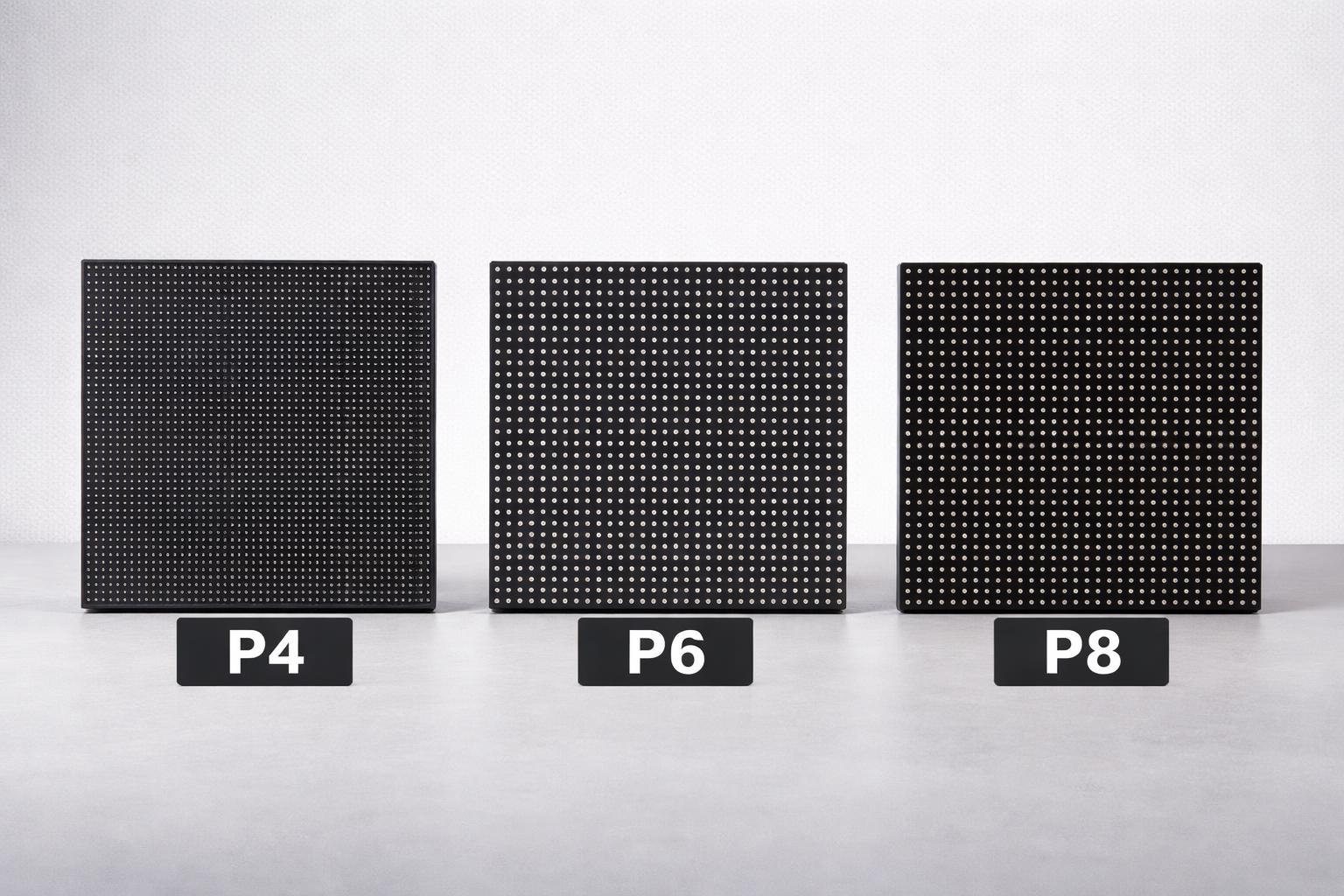
Pixel pitch (in millimetres) measures the gap between individual LEDs on a sign. A smaller number (e.g. 4 mm) means LEDs are packed tightly, producing a higher pixel density and crisper image. For example, a P4 sign has 4 mm between LEDs (about 62,500 LEDs/m²), whereas a P8 sign has 8 mm (only 15,625 LEDs/m²). Closer pixels let you read text and see detail at short range – ideal for foot traffic or close-up viewing. Larger pixel pitch lowers resolution but increases viewing distance (and is cheaper). As Impact LED puts it, “the smaller the pitch, the closer the pixels, and the crisper your image will look from up close”. Conversely, larger pitches (e.g. P10 or P15) are suited for long-range billboards.
In practical terms, pixel pitch directly affects three things:
- Resolution and Image Quality: Smaller pitch yields finer detail. A P4 display will show tiny text sharply, whereas a P8 panel might render that text as a blur. Blink Digital’s high‑density screens ensure messages “remain crisp and legible” even at close range.
- Viewing Distance: Pixel pitch dictates how far away viewers should stand. As a rule of thumb, a P4 LED sign performs best around 4 m and beyond, P6 around 6 m, P8 roughly 8 m, and P10 about 10–12 m. Impact LED’s guide suggests a P4 display is clear from ~4 m (13 ft) and P6 from ~6 m (20 ft). Chainzone’s data for outdoor signs aligns with this: P4 is ideal at ~8–12 m, P6 at 12–18 m, and P8 at 16–24 m. If you put a P4 sign 20 m away, you’re overspending on detail; if you try to view a P8 sign from 5 m, the image will look blocky.
- Cost and Power: Finer-pitch signs cost more per square metre (more LEDs, more processing), and use more power. Larger pitches are more cost-effective for big displays. Chainzone notes P4 offers “very high” image quality (at highest cost), whereas P8 gives “good” visibility at a lower cost. Blink Digital helps clients balance budget and performance by recommending the smallest pitch that still meets the viewing distance requirements.
In short, the right pixel pitch is all about matching content detail and viewing distance. Use too coarse a pitch for close-up viewing, and small text becomes unreadable. Use too fine a pitch for long-range signs, and you waste money (and may run into power or weight limits). Blink Digital’s Brisbane signage experts factor in both distance and content when advising customers on pixel pitch.
Pixel Pitch vs. Viewing Distance: A Rule of Thumb
Choosing pixel pitch often starts with “How far away will people be when they read this sign?” The larger that distance, the bigger the pixel pitch you can use. Impact LED provides a quick guide:
- 4 mm pitch (P4): Best viewed from 4 m (13 ft) and up.
- 6 mm pitch (P6): Best from 6 m (20 ft) and up.
- 9 mm pitch (P8–P9): Best from 8–9 m (26–30 ft) and up.
- 15 mm pitch: Best from 15 m (50 ft) and up.
In other words, a P4 sign should be installed where people will be only a few metres away – think shopping mall foyer or roadside store entrance. A P8 or P10 sign, by contrast, is intended for highways or stadium exteriors, where drivers or spectators are tens of metres away. As Corporate Sign Industries explains, if someone is within 5–10 m of a sign, P4 will show fine detail and small fonts clearly, whereas P6 or P8 might start to look jagged at that range. They even recommend a P4 sign for pedestrian audiences (close-up viewing) but say a P6 sign “uses less electricity” and is more cost-effective for motorists (vehicles). In short: closer viewing = finer pitch (higher resolution), and farther viewing = coarser pitch.
Imagine a car dealership with an outdoor LED billboard on a pylon by the road. Drivers on the highway pass at 60 km/h roughly 15–25 m away – a perfect use for a P6 or P8 screen. Blink Digital recently installed a 2.4 m × 1.28 m P6 sign for a school, as it provided good resolution up close for pedestrians while keeping costs down. If that school instead needed a sign visible to distant traffic, a P8 might be chosen. Conversely, for a church whose sign is read mainly by people in the immediate carpark, a P4 sign ensures sermons, times or announcements look sharp even for someone walking by.
Key point: Always match the pixel pitch to the typical viewing distance of your audience. A good litmus test is to stand at the furthest point you expect viewers to be and verify the text is legible. As one expert guide notes, “every viewing environment is unique” – content designers and installers should plan pixel pitch based on the real-world placement.
Comparing P4, P6 and P8: Strengths & Use Cases
Let’s compare the three common pixel pitches in terms of image quality, cost, and ideal applications:
-
P4 (4 mm): Highest resolution. Delivers very crisp images, fine text and video quality. Sharpest image quality of the three. Best for applications where viewers are very close (e.g. inside shops, malls, or street‑front locations). Examples: retail shop windows, building lobbies, galleries, or any digital signage meant for passing pedestrians. Because of the density, P4 signs are more expensive to build. They also consume more power and weigh more. However, they avoid any pixellation for close viewing. Blink Digital often recommends P4 for high‑traffic retail fronts or when brand graphics require maximum clarity.
-
P6 (6 mm): The “sweet spot” for many outdoor signs. Still high detail, but lower cost than P4. According to Corporate Sign Industries, P6 screens will look slightly less sharp than P4 if viewed at 5–10 m, but they remain “easily readable”. A P6 sign is ideal for most medium-distance outdoor uses: gas stations, supermarkets, community centers, school marquises, car parks and larger shop fronts where viewers might be 5–15 m away. It often hits the balance between quality and budget, so it’s very popular. Blink Digital’s product range includes many P6 signs for just this reason. A Brisbane cafés or service station might choose a P6 sign so drivers and nearby pedestrians both see a clear image without the higher price of P4.
-
P8 (8 mm): Lower resolution, designed for farther viewing. An 8 mm pitch sign packs far fewer LEDs per square metre, so it cannot display small details like P4/P6 can. But it’s much more cost-effective and still quite bright and visible for distant traffic. Typical uses: highway billboards, roadside signage, sports venues, and shopping centre totem signs that are viewed from 15–30 m away. For example, a roadside petrol station sign on a tall pylon or a council billboard would often be P8 or even P10, because people aren’t reading it from within a few metres. As Chainzone’s comparison shows, P8 has “good” image quality for its use case and is much cheaper than P4/P6. If you have extensive distance (over ~12m), a P8 should suffice, and you avoid overspending on the extra sharpness of P4.
Chainzone’s LED manufacturer data illustrates these trade-offs. P4 (4 mm) delivers the highest pixel density (62,500 pixels/m²) and very high image quality, but at the highest cost and only 4–12 m ideal range. P6 (6 mm) still offers high quality at medium range (12–18 m) with lower cost. P8 (8 mm) has fewer pixels (15,625/m²), good image quality at longer range (16–24 m), and is more cost-effective. P10 and above are for highway distances (20–30 m), where detail matters least. In practice, most on‑site consultations will find P4 for close‑up, P6 for community/retail use, and P8 for large outdoor signs.
Industry Examples
Different industries have different needs. Here are some typical scenarios and suggested pixel pitches:
-
Retail Shopfront (Foot Traffic): Often want to showcase promotions and logo graphics to pedestrians. Viewers are very close (a few metres). P4 is recommended to keep text sharp from the sidewalk. A P6 could suffice if budget is tight, but P8 would likely appear blocky up close. Blink Digital has installed P4 and P6 signs in Brisbane shopfronts so that colours pop and text is readable from the street.
-
Schools & Community Centres: Audiences include students/parents walking by or driving in. Viewing distance might range from 5–10 m (parking or footpath). A P6 sign is usually sufficient here – it can show news, event details or “Welcome to School” clearly. In tight budgets, P6 is a cost-effective compromise; P4 can be used for very compact or indoor bulletin boards. Schools don’t typically need P8 unless the sign is very high up and meant for distant cars.
-
Automotive Dealerships: Showrooms often use indoor video walls (fine pitch) plus outdoor signs. For an outdoor used-car yard or pylon by the road, P6 or P8 is typical. For example, Blink Digital installed an outdoor display at a Brisbane dealership with P6 pitch, because customers drive by at moderate distance. If the sign is mainly seen by highway traffic, P8 might be chosen to save cost. However, for in‑showroom displays where customers stand very near, P4 (or even smaller) may be used.
-
Churches and Community Signage: These are often read from the street by passing cars (maybe 10–20 m away). A P6 is common to balance visibility with budget. If the church is on a busy highway and wants long-range visibility, P8 could be used. If the sign is more for pedestrians on the footpath, P4 or P6 keeps sermon times and announcements crisp. Blink Digital’s portfolio includes both church P6 signs and even larger church marquees built with P8 where needed.
-
Roadside Billboards: When targeting motorists on a busy road or freeway, viewing distances can be quite large (20–50 m). In these cases, P8, P10 or larger are the norm. For example, a digital billboard at a highway junction might use P8–P10 to ensure the image doesn’t look pixelated at highway speeds. P4 here would simply be overkill (and not readable from that far anyway).
In each case, the goal is the same: fit the pixel pitch to the typical viewing scenario. If your content includes small text or detailed graphics and your audience is close, choose a finer pitch. If viewers are only seeing the sign from afar, a coarser pitch suffices and saves money. Blink Digital’s team advises each customer on these trade-offs during the design process, ensuring the result suits the specific Brisbane location and audience.
Balancing Resolution, Cost and Future Needs
While choosing pixel pitch, also consider long-term needs. A finer pitch not only costs more initially but also increases shipping weight, electricity use, and the number of parts that might need maintenance. On the other hand, too coarse a pitch could mean planning another sign sooner if the first one doesn’t meet communication goals.
Key factors to weigh:
- Budget vs. Benefit: If very high detail isn’t needed, there’s no point overspending on P4. A P6 or P8 might do 90% of the job at 70% of the cost. But if your branding requires photo‑quality images and lots of text, bite the bullet on P4. Blink Digital can provide cost comparisons showing how pixel pitch affects price, so you can choose based on ROI.
- Content Strategy: Think about what you will display. If you only plan to show big colourful headlines and simple graphics, you can likely get away with larger pitch. If you want to run video, animations, or detailed product shots, finer pitch is better.
- Future-proofing: Display technology improves over time. If you expect to keep the sign for many years, consider slightly finer pitch now to avoid it looking outdated later. However, don’t overspecify on “future needs” more than you need today.
- Long-term Maintenance: Smaller pixel pitch screens have more LEDs per panel. If an LED fails or if the screen gets damaged, maintenance or replacements can be more involved. Ensure there is a good warranty and local support (Blink Digital offers 5‑year warranties and Australia‑based service).
- Power and Brightness: Higher-density screens can sometimes require more power (more LEDs lit). However, modern designs and power supplies often mitigate this. Verify power requirements and ensure your site can support it.
Finally, there is the factor of standard compliance and environment. In Brisbane’s subtropical climate, LED screens must handle heat, humidity and bright sun. This doesn’t directly affect pixel pitch, but it does mean you want high-quality modules. For example, Blink Digital uses modules rated for Queensland conditions (such as high-brightness 5,000+ nits for daylight). You’ll need to confirm the sign’s brightness can adjust as required (more on that below).
Why Screen Size Matters When Choosing Pixel Pitch
Pixel pitch should never be considered separately from the overall dimensions of the LED display. Two screens using the same P6 technology can deliver very different results if one is significantly larger than the other. A larger screen contains more pixels across its width and height, giving designers more room to display clear headlines, branding, images and promotional messages.
For example, a compact P6 display may be suitable for simple school announcements or short retail promotions, but it may not have enough total resolution for detailed photographs, multiple product offers or longer lines of text. In that situation, the business may need a larger P6 screen or a finer P4 pitch. Conversely, a very large P8 display can still produce an effective, visually impressive image when viewed from the correct distance, even though it has a lower pixel density than P4 or P6.
This is why Blink Digital considers the complete screen configuration rather than recommending pixel pitch based on a single measurement. Our team assesses the available installation space, viewing angle, audience distance and type of content the business intends to display. We can then calculate the likely screen resolution and explain whether the proposed design will remain readable in real-world conditions.
When comparing LED signs Brisbane businesses should also consider the shape of the screen. A wide-format display may be ideal for short promotional messages, while a taller display could suit directories, event information or multiple content sections. Choosing the correct combination of screen dimensions and pixel pitch helps ensure your digital signage Brisbane solution delivers clear communication without unnecessary expense.
Brisbane Standards and Outdoor Considerations
When installing outdoor LED signs in Brisbane, there are local rules and practical considerations beyond pixel pitch:
-
Council Brightness Limits: Brisbane City Council’s sign rules (AS/NZS 4282) cap the nighttime brightness of digital signs to roughly 300–500 cd/m² depending on location. (Note: 1 nit = 1 cd/m².) Signs usually run much brighter during the day for visibility, but must auto-dim at night. Blink Digital’s outdoor screens exceed 5,000 nits (5,000 cd/m²) in sunlight, then automatically reduce brightness after hours. This meets and exceeds council requirements, preventing glare to neighbours.
-
Weather and Durability: Brisbane’s high UV, heat and rain demand outdoor screens to be fully weatherproof (IP65) and UV-stable. Blink Digital ensures its outdoor cabinets have the necessary rating and cooling, and meets wind-loading standards for rooftop installations. Pixel pitch options are available for IP65 outdoor modules, so you’re not limited by weather conditions.
-
Content Dwell Time & Safety: Digital signage content is typically required to hold each message for a set minimum time (dwell time) to avoid driver distraction. Pixel pitch itself doesn’t affect this, but good design will ensure content is large and readable quickly. Blink Digital’s CMS can lock content for appropriate intervals, and its designers follow local advertising laws.
-
Engineering and Approvals: Large LED signs must comply with electrical, structural, and safety codes. Pixel pitch indirectly affects weight and power, but Blink Digital handles all engineering details. During installation, they will position the screen at an optimal height and angle (which determines viewing distance) and ensure council approvals cover all technical specs.
In summary, while pixel pitch is a prime technical choice for image quality, Blink Digital also manages the environmental and regulatory aspects so your new digital signage is not only clear, but safe and legal in Brisbane.
Key Takeaways for Brisbane Businesses
- Match Pitch to Distance: Remember the rule of thumb: P4≈4 m, P6≈6 m, P8≈8 m. For example, if the sign will mostly be seen by people 5 m away, P4 or P6 is ideal; if 20 m away, P8 or coarser should be used.
- Consider Use Case: Foot traffic (shops, schools) calls for finer pitch (P4/P6); roadside/highway (billboards, stadiums) can use P8 or larger.
- Content Matters: Small fonts or detailed images need finer pitch. Simple messaging (e.g. “Open 8am-5pm”) may be fine on P6 even close up.
- Budget Smartly: Don’t overspend on P4 if you won’t use its extra detail. Blink Digital can provide quotes comparing P4 vs P6 vs P8 for your sign size.
- Quality Counts: Choose a reputable provider (like Blink Digital) to ensure the modules are high-quality and compatible with Brisbane conditions.
Why Blink Digital?
As Brisbane’s local LED specialist, Blink Digital combines deep product knowledge with on-the-ground experience. We help you pinpoint the correct pixel pitch for your specific project. In fact, our team “provides expert advice on selecting signs with optimal brightness and pixel pitch” for each location. We’ll assess your site’s viewing distance, space constraints and budget, then recommend P4, P6, P8 or other spacing accordingly.
Blink Digital’s screens use premium LEDs rated for Queensland’s climate (high brightness and weather resistance), and our designers will ensure your content takes full advantage of the chosen resolution. We stay up-to-date on Brisbane regulations (like AS/NZS 4282 limits) so your sign is compliant. And because we handle everything – from design and permitting to installation and support – your investment is protected.
If you’re planning an LED sign or a broader digital signage Brisbane solution, talk to us about pixel pitch. We’ll help you avoid common pitfalls (such as over‑pixelation or overspending), and guide you to the most effective display for your audience. Whether you need a sharp P4 shopfront sign or a vivid P8 outdoor billboard, Blink Digital can deliver the right fit.
Ready to light up your brand with the perfect LED display? Contact Blink Digital today for a free consultation on your signage project. Our experts will recommend the ideal pixel pitch and design to make your messages pop – at the best value for your Brisbane business.