Digital signage becomes a different challenge when your business has multiple locations
Managing a single digital screen can be relatively straightforward. You decide what needs to appear, prepare the content, publish it and change it when the promotion ends. Managing digital signage across ten stores, twenty franchise locations or an expanding network of venues is a very different operational challenge.
Suddenly, the question is not simply, “What should we put on the screen?” It becomes: Who controls the message? Which stores should receive it? When should it appear? What can the local manager change? How do we know the correct promotion is actually showing? And how do we keep every location looking like the same brand while still making the content relevant to local customers?
That is where a well-planned multi-location digital signage strategy becomes important.
Modern digital signage platforms can organise displays into locations or groups, schedule content for particular dates and times, deploy material remotely and provide central visibility over a distributed screen network. Samsung, for example, documents the ability to organise playlists, schedule them around business hours and use tags based on attributes such as location or department. BrightSign similarly offers remote monitoring, configuration, diagnostics and centralised scheduling for fleets of signage players.
For franchise operators, retailers, hospitality groups and other multi-site organisations, those capabilities change digital signage from a collection of disconnected advertising displays into a centrally managed communication network.
That distinction matters.
A national promotion may need to appear everywhere at exactly the same time. A Brisbane store may need to advertise something that is irrelevant to a location elsewhere in Australia. A restaurant may want breakfast offers in the morning and dinner promotions later in the day. One franchisee may need permission to upload details of a local community event but should not be able to change a national brand campaign. Head office may need to remove an expired promotion across every location without relying on dozens of managers to do it manually.
Centralised digital signage can support all of those scenarios when the network, permissions and content strategy are designed correctly. Commercial CMS platforms now provide tools for location grouping, scheduling, granular user access and remote management precisely because larger signage networks require different controls from standalone displays.
At Blink Digital, this is where we encourage businesses to think beyond the screen itself.
Blink Digital provides customised digital signage solutions for businesses of different sizes, including the design, installation and ongoing management of displays. Our range spans outdoor LED signage, indoor LED screens, LCD displays and other commercial signage formats, allowing a multi-location solution to be planned around what each environment actually needs rather than assuming every location should use identical hardware.
For a growing business, the goal should be simple: central control where consistency matters, local flexibility where relevance matters, and a structure that remains manageable as more locations and screens are added.
The rest of this guide explains how to achieve that.
Why multi-location digital signage needs a clear operating model
One of the easiest mistakes to make with digital signage for multiple locations is to focus on hardware first.
A business may decide that every store needs two screens, arrange installation and only afterwards ask who will manage them. That can lead to duplicated work, outdated promotions, inconsistent branding and local teams being unsure about what they are permitted to publish.
A stronger approach starts with the operating model.
Before deciding how many displays are required, consider how information should move through the organisation.
For most multi-site businesses, there are at least three levels of content:
Brand-wide content is controlled centrally and applies to all relevant locations. Examples include national promotions, corporate videos, loyalty campaigns, major product launches, brand messages and seasonal creative.
Regional or group content applies only to selected sites. A Queensland campaign, for example, may be appropriate for Brisbane, the Gold Coast and Sunshine Coast but not for locations operating under different conditions elsewhere in Australia.
Local content belongs to one store, restaurant, showroom or venue. Examples might include a store-specific event, local trading hours, a community sponsorship, a localised offer or information relevant only to customers at that site.
This hierarchy is well suited to the way enterprise signage platforms organise screens. ScreenCloud, for example, uses concepts such as Spaces, Groups and roles to separate different physical locations and user permissions, while Samsung VXT supports custom tags that can identify screens by location, department or other business-defined categories. These are examples of a broader principle: a signage network should be structured in a way that reflects the organisation itself.
For digital signage for franchises, the model may need another layer.
A franchisor often has a legitimate need to protect national branding and campaign consistency, while individual franchisees understand their own customers, stock, local events and trading environment. A completely centralised model can make every location consistent but unnecessarily rigid. A completely decentralised model can give individual stores freedom but make the overall brand difficult to control.
The practical answer is usually not “central versus local”. It is central plus local, with clearly defined boundaries.
For example, head office could own the primary promotional playlist and brand templates. Regional managers could control certain campaign slots. Local operators could be given one or two approved areas in which they may publish store-specific material.
A franchise location might therefore display:
National campaign → local promotion → national product message → local event → national brand content
The customer experiences one coherent brand, but the screen still feels relevant to that individual location.
This is an important distinction for businesses considering centralised digital signage. Centralisation should not necessarily mean that every screen shows precisely the same material. It means that the business has a controlled system for deciding what appears where, who can change it and when it should change.
Blink Digital already works with business environments where these distinctions matter. Our dedicated franchise and fast-food signage offering is designed for both individual sites and franchise networks, while our retail signage solutions cover customer-facing commercial environments across Brisbane and Australia.
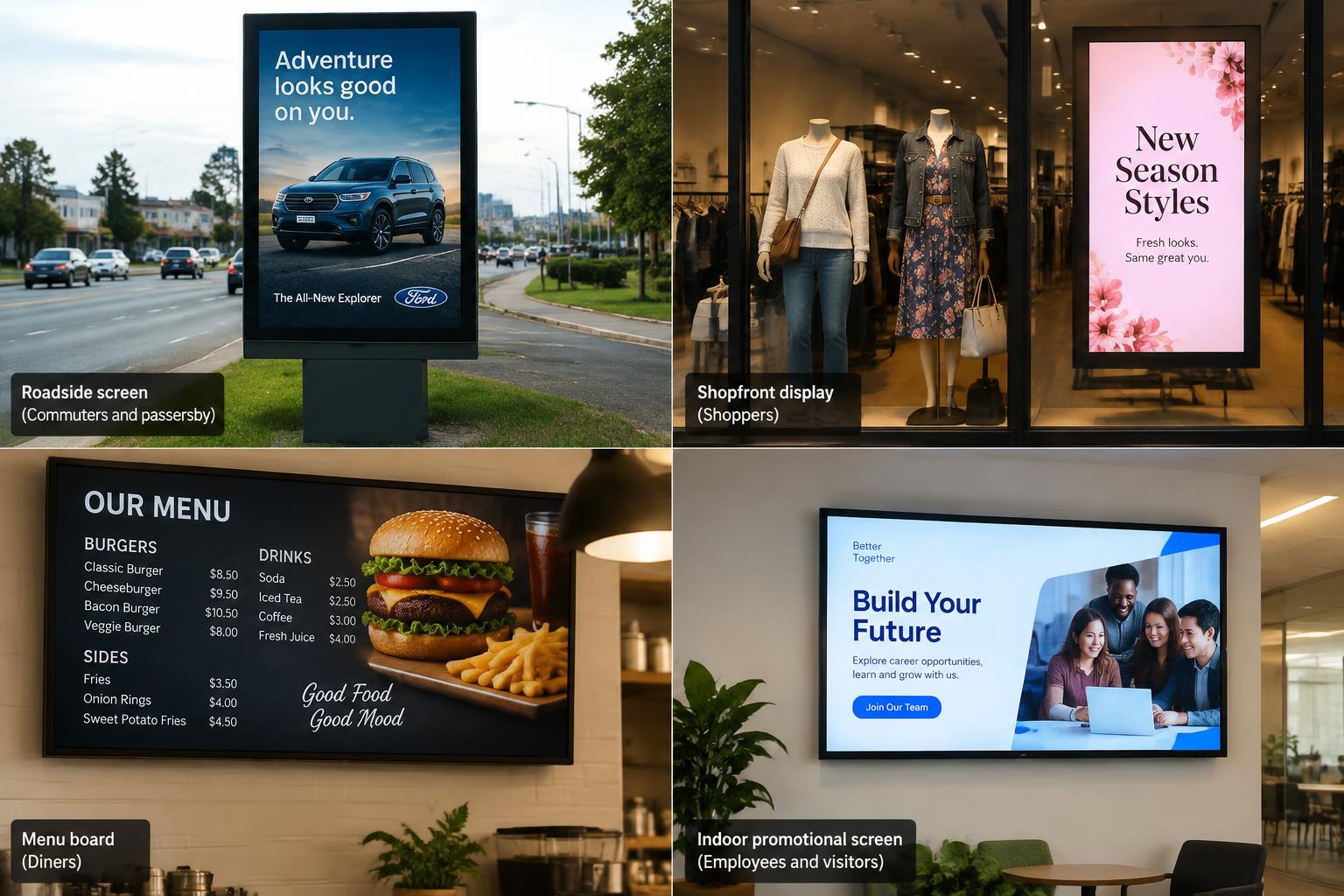
When planning a network with Blink Digital, we can help assess the role of each display before the physical solution is finalised. A roadside screen, shopfront display, menu board and indoor promotional screen may all belong to the same organisation, but they serve different audiences and should not automatically receive the same content.
That planning stage is what turns a collection of screens into a useful signage system.
Centralised scheduling keeps campaigns coordinated without making every store identical
For marketing teams, one of the most valuable parts of digital signage content management is the ability to decide in advance where and when material should appear.
Commercial digital signage software can schedule content according to dates, days and times, assign it to selected screens or locations and update displays remotely. Samsung describes CMS scheduling that determines the start and end date, time and destination for particular content, while BrightSign’s current platform supports centralised scheduling and fleet-wide management.
For a multi-location business, that creates several practical opportunities.
Campaign launches can be coordinated. Imagine a retail group launching a promotion across fifteen locations at 9 am on Thursday. Instead of sending files to fifteen managers and asking them to update their displays, the campaign can be prepared ahead of time, assigned to the relevant locations and scheduled to begin at the required time.
Campaigns can also expire automatically. This is just as important as launching them. A “sale ends Sunday” message still appearing on Monday can confuse customers and create unnecessary work for store teams. Start and end scheduling helps organisations build campaign expiry into the publishing process rather than relying solely on somebody remembering to remove the artwork. Scheduling and remote updates are core functions in contemporary digital signage CMS platforms.
Content can be dayparted. A hospitality business, for example, may have very different communication needs at breakfast, lunch and dinner. Retailers can change messaging between quieter periods and peak shopping times. A fitness chain might advertise morning classes early in the day and evening sessions later.
The important point is that scheduling should follow the business, not simply the capabilities of the software.
A useful content calendar for a multi-location network could contain five dimensions:
| Content decision | Example |
|---|---|
| Where? | All stores, Queensland stores or Brisbane CBD only |
| When? | 1–14 December |
| What time? | Lunch period only |
| Who owns it? | National marketing |
| What happens afterwards? | Automatically return to evergreen playlist |
This is where the difference between central control and indiscriminate broadcasting becomes clear.
Suppose a hospitality group operates locations in Brisbane, regional Queensland and interstate. A single national campaign might run at every location, while a Queensland-specific promotion runs only on Queensland screens and a local event appears only at one Brisbane venue.
A central platform can make that structure manageable because displays can be organised or tagged by criteria such as location. Samsung specifically describes using tags based on location and other identifiers, while ScreenCloud’s Spaces allow organisations to organise screens and content around physical or virtual locations.
The same principle works for different screen types within one store.
Consider a retail location with:
a large outdoor LED sign facing passing traffic;
a digital shopfront screen;
an LCD display near the point of sale; and
an internal screen behind the counter.
Those screens should not necessarily receive identical creative.
The outdoor display may need an extremely simple message that can be understood quickly. The shopfront screen can provide more product detail. The point-of-sale display can promote add-ons or loyalty offers. The staff-facing display could communicate operational information rather than customer advertising.
Blink Digital’s existing range includes outdoor LED signage, indoor LED solutions and LCD displays, meaning we can help businesses plan different display types around the purpose and conditions of each location instead of treating every screen as interchangeable.
This becomes particularly important as a network grows.
With five locations, informal processes may still appear manageable. At fifty locations, every manual exception becomes multiplied. A successful multi-location signage strategy therefore needs repeatable rules: consistent screen names, consistent location groups, clear content categories and predictable campaign schedules.
A simple naming system such as:
QLD – Brisbane CBD – Queen Street – Shopfront – Screen 01
is far easier to manage than a dashboard containing devices called “Screen 1”, “New Screen”, “TV Brisbane” and “Store Display”.
That may sound like an administrative detail, but good network organisation makes it much easier to send the right content to the right destination and reduces the risk of selecting the wrong screen during a campaign rollout. This is an inference from the location grouping, tagging and fleet-management capabilities used by major signage platforms.
At Blink Digital, we can help multi-site businesses think about these practical requirements during the planning stage so the signage is designed to support future growth, not merely the number of locations operating today.
Staff permissions protect the brand while giving local teams useful flexibility
Installing digital signage across multiple locations creates another important question:
Who should be allowed to publish?
Giving everybody administrator access is easy in the beginning, but it becomes increasingly risky as the network expands.
Modern enterprise digital signage platforms address this through role-based permissions. ScreenCloud, for example, documents the ability to separate users through Roles, Spaces and Groups and give particular teams access to selected screens, areas or functions. Its enterprise controls can also create custom roles with more granular permissions.
For a franchise, retail chain or hospitality network, a practical hierarchy might look like this:
| User | Appropriate control |
|---|---|
| Head office administrator | All locations, users and publishing controls |
| National marketing team | Brand campaigns and national playlists |
| Regional manager | Approved screens within their region |
| Store manager/franchisee | Local content slots at their own location |
| Local staff member | Drafting content but not final publishing |
| IT/support team | Device health and technical management |
This approach allows local knowledge to be used without giving every individual unrestricted control over the entire network.
It can also introduce approvals.
A local manager, for example, could create a promotion using an approved template, submit it for review and then have a regional or brand administrator authorise publication.
That type of workflow can be especially useful for digital signage for franchises, where maintaining a recognisable brand has to be balanced with local marketing requirements.
Templates can play an important role too.
Instead of asking each location to design signage from scratch, a head office team can create approved layouts containing the correct typography, logo placement and core design structure. Local teams only change defined fields such as a product image, event name, price or date.
The result is local variation without starting again creatively at every site.
There is also a security dimension to permissions.
Because cloud-managed signage accounts can potentially control customer-facing screens, they should be treated as business systems rather than casual social-media-style accounts. The Australian Signals Directorate’s Australian Cyber Security Centre recommends multi-factor authentication for business accounts, describing MFA as one of the most effective protections against account compromise.
For multi-location operators, sensible account practices therefore include individual user accounts rather than shared passwords, access based on job requirements, removing access when staff leave or change roles, using multi-factor authentication where the chosen platform supports it, and reviewing administrator privileges periodically. These recommendations align with Australian Cyber Security Centre guidance on protecting business accounts and identities.
There should also be a plan for urgent communication.
A normal campaign hierarchy might allow individual stores to control a portion of their content, but a business may occasionally need the ability to override normal playlists quickly. Depending on the organisation, that might involve changed opening conditions, an operational notice or another time-sensitive message.
The exact workflow will depend on the signage platform and organisation, but the underlying principle is straightforward: decide who has override authority before you need to use it.
Another useful capability is proof of play.
Proof-of-play systems record whether scheduled content has actually played, often including information about where and when it appeared. ScreenCloud describes its Proof of Play feature as logging and tracking content shown on digital screens, while Samsung’s digital-signage glossary describes playback verification as confirming and logging whether scheduled material played on displays.
For a multi-store promotion, this can answer an important question that is otherwise surprisingly difficult:
Did the campaign actually run at the locations where it was supposed to run?
That can help marketing teams distinguish between campaign planning and campaign delivery. It is particularly relevant when a promotion has commitments to suppliers, franchisees, advertisers or other stakeholders.
Not every business requires every enterprise feature, however.
A ten-location retailer does not automatically need the same governance model as a national organisation with hundreds of displays. The objective is to choose controls that match the real operating environment.
Blink Digital can help businesses work backwards from those operational requirements. Before selecting the signage configuration, it is worth asking how many locations will be involved, how frequently content changes, which teams need access, whether local managers need publishing rights and how much central oversight is required.
That information helps shape a digital signage system that is manageable in practice rather than impressive only on the specification sheet.
Choosing the right screens for different stores and environments
A central digital signage strategy does not require identical hardware at every location.
In fact, insisting on exactly the same display everywhere can sometimes create unnecessary compromises.
A screen installed behind the counter of an air-conditioned retail store faces completely different conditions from an outdoor display exposed to daylight. A roadside LED sign viewed from a moving vehicle serves a different purpose from an LCD display viewed from a metre or two away. A flagship store may have room for a large feature installation that simply does not make sense in a small suburban outlet.
Commercial indoor and outdoor displays are engineered for different conditions. As one current Australian example, Samsung lists commercial indoor signage ranges at brightness levels such as 350, 500 and 700 nits, while some of its dedicated outdoor signage is rated above 3,500 nits and uses automatic brightness adjustment for changing external light. The exact specification needed will depend on the screen technology, location, installation and viewing conditions, but the comparison illustrates why indoor and outdoor displays should not be selected as though they perform the same job.
Blink Digital offers multiple formats for precisely this reason. Our current range includes outdoor LED signage, indoor LED signage, LCD displays, large billboards, shopfront signage and other specialist formats.
When planning multi-location digital signage, consider each location according to several practical factors.
Viewing distance affects the most suitable display format and content design. Someone approaching a roadside sign has a different viewing opportunity from someone standing in a reception area.
Ambient light matters because an outdoor or high-sunlight installation generally needs much greater brightness than a controlled indoor environment. Dedicated outdoor commercial displays are designed accordingly.
Operating hours should also be considered. Some commercial signage is designed for continuous or extended operation, while other displays have different operating-hour specifications. Samsung’s current Australian commercial line-up, for example, includes display classes specified for either 16/7 or 24/7 use.
Physical environment matters too. Outdoor displays need to be specified for the conditions in which they will operate; commercial outdoor product families may incorporate protection and design features that are not required on ordinary indoor screens.
Customer journey may be the most important factor of all.
Ask what the customer is doing when they encounter the screen.
A motorist passing a roadside LED display may have only seconds to absorb one simple message.
A shopper walking through a store can spend longer with a product promotion.
A restaurant customer at the counter may be actively making a purchase decision.
A person in a waiting area has time for more detailed information.
The content and hardware should follow that behaviour.
This is one reason Blink Digital’s broader signage range can be useful to multi-site organisations. Rather than forcing every location into one hardware format, we can help determine whether an indoor LED screen, outdoor LED display, commercial LCD or another signage configuration is better matched to each site. Blink Digital’s website currently positions the business as providing customised digital signage solutions and managing design, installation and maintenance, with screens and signage designed for a range of commercial environments.
The same thinking should be applied to connectivity.
A cloud-managed network depends on reliable communication between its management platform and the installed signage system. Remote management platforms can provide screen status, player monitoring, diagnostics and configuration controls, allowing many technical tasks to be handled without an immediate site visit. BrightSign, for example, supports remote monitoring, bulk configuration, rebooting, diagnostics and updates across multiple locations, while Samsung VXT includes central remote display management.
This does not eliminate the need for physical servicing, but it can make a distributed network much easier to supervise.
The important buying question is therefore not simply:
“Which screen should we buy?”
For a multi-location operator, a better question is:
“What combination of displays, content control, network management and support will be easiest to operate across all of our locations for the years ahead?”
Blink Digital can help businesses answer that question before installation begins.
How to roll out, measure and scale a digital signage network
Once the operating model, content structure and screen requirements have been decided, the next challenge is rollout.
For organisations with multiple locations, there is a strong argument for treating the first installations as a controlled pilot rather than immediately replicating an untested model everywhere.
A pilot can reveal practical issues that are difficult to identify on a spreadsheet: whether the screen is positioned where customers actually look, whether the creative is readable, whether store staff understand their permissions, whether scheduled campaigns change correctly, whether connectivity is reliable and whether the proposed content workflow creates unnecessary administration.
Digital-signage deployment guidance commonly emphasises that signage should be treated as a complete system rather than merely a display. ScreenCloud, for example, describes a digital-signage deployment as a combination of screens, players, content and management processes and notes that early technology choices affect subsequent expansion.
A sensible rollout might therefore progress from:
pilot location → small location group → regional rollout → wider network.
At each stage, document what has been learned before duplicating the configuration.
This is also the right time to create a digital signage playbook.
That document does not need to be complicated. It simply needs to answer the questions that otherwise end up being solved differently by every store.
It might specify:
who owns national content;
who approves local promotions;
how screens and locations are named;
which templates are approved;
how far in advance campaigns should be uploaded;
how start and expiry dates are handled;
what local managers are permitted to change;
what happens when a display is offline;
who receives technical alerts;
and who staff contact when they need support.
For larger networks, the CMS dashboard should become part of normal marketing operations rather than a separate technical tool used only when something goes wrong.
Campaigns can be planned around location groups. Promotions can be scheduled before launch. Content can automatically expire. Screen status can be monitored remotely where the platform supports it. Proof-of-play data can confirm whether selected material appeared on the intended displays. Modern enterprise platforms support combinations of these capabilities, including scheduling, remote management, screen grouping and playback reporting.
Measurement should also go further than asking, “Did the screens look good?”
Digital signage is a communication channel, so the useful metric depends on the purpose of the message.
For a retail promotion, the business might compare promoted-product sales between periods or stores.
For a restaurant, it might examine uptake of a featured meal or offer.
For a service business, a QR code or campaign-specific landing page can provide a measurable response mechanism.
For an operational screen, success may simply mean that the correct information reached the required locations at the required time.
The important point is to define the objective before the campaign begins.
A particularly useful approach for a multi-location organisation is controlled testing.
Instead of changing every variable everywhere, a business can compare two groups of similar locations, change one element of the campaign and examine the resulting commercial data. This does not prove that signage alone caused every difference—the locations may differ for many other reasons—but it creates a more disciplined way of learning than relying only on impressions.
Over time, those results can help the organisation decide which messages deserve more screen time, which locations respond to particular offers, which parts of the day are most useful and which local adaptations perform better than a single network-wide creative.
This is where multi-location digital signage can become more sophisticated without becoming chaotic.
The central marketing team defines the framework.
Regional teams contribute relevant market knowledge.
Local managers contribute specific local information.
The technology distributes it.
The organisation measures what happened.
Then the next campaign improves.
For growing businesses, scalability should remain part of the decision from the beginning. Current commercial platforms are specifically designed to manage anything from relatively small installations to large fleets: Samsung describes VXT as scalable for expanding screen networks, while BrightSign provides central fleet-management tools designed for multiple players and locations.
That means a business planning ten screens today should at least consider what happens if the network becomes thirty or one hundred screens later.
Will locations remain easy to organise?
Can permissions scale without sharing accounts?
Can content be sent to groups rather than one screen at a time?
Can new stores be added consistently?
Can support teams see whether devices are operating?
Can campaign managers confirm what played?
Can the business introduce a new regional structure without rebuilding the network from the beginning?
These are often more important long-term questions than whether one display has a slightly different specification from another.
At Blink Digital, we can help franchise groups, retailers, hospitality businesses and other multi-site organisations approach the project as a complete signage system. Blink Digital is based in Brendale, Queensland, and provides digital signage production, installation and management for businesses in Brisbane and across Australia.
Whether you are fitting out several Brisbane locations, standardising an existing Queensland network or planning signage across a growing national business, we can help evaluate screen types, locations, installation requirements and the practical management needs behind the network.
Frequently asked questions about multi-location digital signage
What is multi-location digital signage?
Multi-location digital signage is a network of digital displays operating across more than one physical business location and managed using a coordinated content and device-management structure. Depending on the system, organisations can group screens by location, send campaigns to selected displays, schedule content and manage aspects of the network remotely. Commercial platforms such as Samsung VXT, BrightSign and ScreenCloud provide different combinations of these capabilities.
For businesses, the key difference from standalone digital signage is scale. Instead of treating every screen as an isolated display, the business establishes common rules for branding, scheduling, permissions, local content and technical management.
Can every store show different content?
Yes, where the selected digital signage content management platform and network configuration support location-based targeting. Modern CMS platforms can group or tag screens and schedule material for particular displays or destinations. Samsung VXT, for example, supports tags based on location and other identifiers and scheduling playlists for selected screens.
That means one campaign can be sent nationally while another appears only in Queensland and a third appears at one store.
The important part is designing that hierarchy intentionally.
Can local store managers update digital signage without changing every screen?
Yes, provided the selected platform supports granular user permissions and is configured appropriately. Enterprise platforms can restrict particular users to selected screens, locations or functions rather than providing full network-wide administrator access.
For many businesses, this is the ideal model: central marketing controls the core brand campaign while individual stores have limited permission to update approved local content.
Is centralised digital signage suitable for franchises?
It can be particularly well suited to franchise networks because it provides a way to combine standardised brand material with controlled local content.
The exact structure should reflect how the franchise operates. A franchisor might own the national playlist and templates, while franchisees control specific local promotional slots.
Blink Digital already provides LED signage solutions for franchise and fast-food businesses, including both individual sites and franchise networks, and can help businesses assess an appropriate display configuration.
Can digital signage campaigns be scheduled in advance?
Yes. Scheduling is a standard capability in many commercial digital signage management platforms. Content can be assigned start and end dates, times of day and particular screens or locations, although the precise functionality varies between products and subscription levels.
For multi-location operators, scheduling can be particularly valuable for coordinated launches, seasonal promotions, dayparting and automatically removing expired offers.
How do we know whether a promotion actually appeared on the screens?
Some systems provide proof-of-play or playback-verification capabilities. These can log whether content played and, depending on the platform, where and when it appeared.
For larger multi-site networks, this can provide an additional level of campaign accountability.
Should all locations use the same type of screen?
Not necessarily.
The appropriate display depends on factors such as whether the location is indoors or outdoors, available space, viewing distance, lighting, operating hours and the role of the screen. Commercial outdoor signage, for example, can have substantially greater brightness than indoor displays because it needs to remain visible in very different lighting conditions.
Blink Digital offers outdoor LED signs, indoor LED signs, LCD displays and other display formats, allowing different sites to be matched to their actual requirements.
Can digital signage be managed remotely?
Many commercial digital signage systems support remote content and/or device management. Depending on the platform, this may include publishing content, checking display status, adjusting settings, rebooting players, diagnosing issues and managing software or configuration updates.
The exact feature set should be confirmed when choosing the hardware and software for a particular network.
What should we plan before installing digital signage across several stores?
Start with the operational questions rather than simply choosing a screen.
Decide what content should be controlled nationally, what needs to vary by region, what local teams can publish, how promotions will be scheduled, how screens will be grouped, who will monitor the network and what display environment exists at each site.
Then select the hardware and content-management structure around those requirements.
That approach is particularly useful because digital signage is a system involving displays, content, management and supporting technology rather than a screen considered in isolation.
How can Blink Digital help with digital signage across multiple locations?
Blink Digital provides customised digital signage solutions and services that include design, installation, management and maintenance. Our current offering includes outdoor and indoor LED signage, LCD displays and other signage options, and we work with businesses in Brisbane and across Australia.
For a multi-location business, we can help assess the individual sites, identify suitable display types and develop a practical signage solution around how your organisation needs to communicate.
Talk to Blink Digital about digital signage for your locations
Running promotions across multiple stores should not mean manually managing every display as a separate project.
With the right multi-location digital signage strategy, your business can maintain a consistent brand, coordinate campaigns from one operating structure, give local teams appropriate flexibility and make it easier to keep promotions relevant and current.
The best solution starts with understanding how your business actually works.
How many locations do you have now?
How quickly do you expect the network to grow?
Which messages need to be consistent?
Which promotions need to be local?
Who should be able to publish?
Where will each screen be installed?
And what should customers see at each point in their journey?
At Blink Digital, we can help you work through those questions and choose digital signage that suits both your locations and your long-term operational requirements. Our team provides customised digital signage solutions for businesses across Brisbane, Queensland and Australia, with support covering the signage project from design and installation through to ongoing management and maintenance.
Whether you are a franchise operator planning a coordinated network, a retail group opening new stores, a hospitality business managing multiple venues or an established organisation looking to bring disconnected displays under a more consistent approach, contact Blink Digital to discuss your project.
Call 0424 505 990, email info@blinkdigital.com.au, or speak with the Blink Digital team about a tailored solution for your locations. Blink Digital’s current contact details list its premises at Unit 1/11 Hinkler Court, Brendale QLD 4500.
The screen is only one part of successful digital signage. The real advantage comes from building a network that your marketing team, locations and customers can rely on—and Blink Digital can help you plan that network from the start.